+44 7435 708864Book a free 30 minute callBook a call

Service

Accounts Payable Automation for UK Firms: Invoices Into Xero, QuickBooks or Sage

Accounts payable automation reads each supplier invoice, matches it to the order and posts it to your accounts, so nobody keys it twice. HAeX builds this for UK firms using Xero, QuickBooks and Sage. A person approves anything the system is unsure about. We scope the price on a call.

  • Invoices post to your own accounts package.
  • Unclear invoices go to a person, not into the books.
  • Every build has a UK GDPR and data flow note.
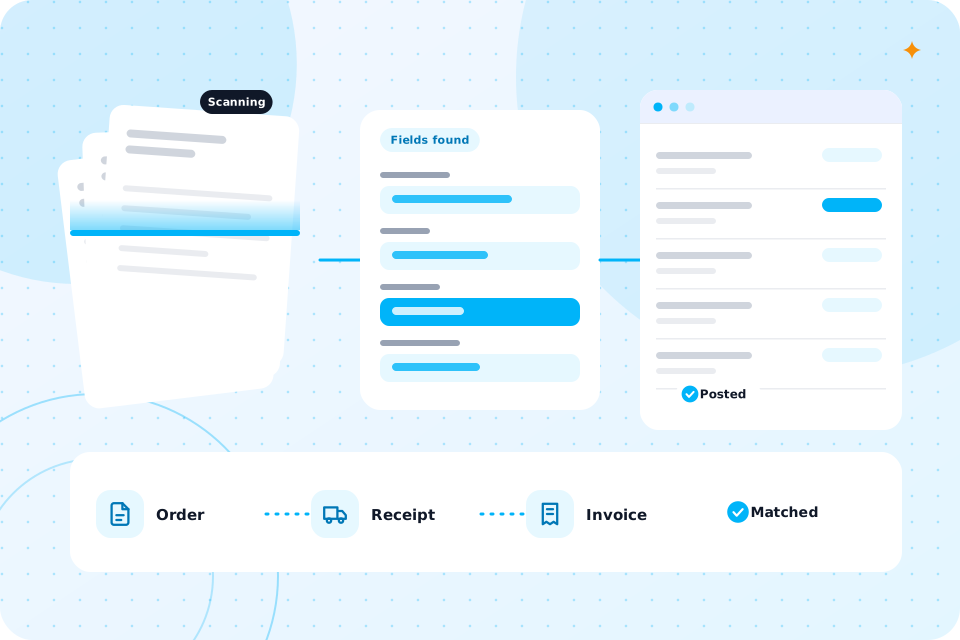
Documents scanned, fields read and entries posted to a ledger
Price
Scoped on a call, quoted in writing before we build
Time to live
Most builds take 2 to 6 weeks
Works with
Xero, QuickBooks, Sage, Outlook, Gmail, shared drives
Tools
Make, n8n, Power Automate, OpenAI, Claude
Data
Where it is stored is agreed per project and written in your data note

Yes, if invoices arrive by email or post and someone types them in. The more invoices you get, the faster it pays back.

Is invoice automation right for my firm?

It suits accountancy practices keying client receipts, and also firms with their own suppliers. Accountants use it for client bills. Construction and trades firms use it for supplier and subcontractor invoices.

What can it read and do?

It can read PDFs, scans, photos and email attachments, pull out the supplier, date, lines, VAT and total, and post a draft bill. This is called invoice processing automation or intelligent document processing.

It can also match an invoice to a purchase order, flag a duplicate, code a line to the right account and chase a missing invoice. It does not pay anything on its own. Payment stays with you.

Advice firms use the same idea for fact finds. See AI for financial advisers and brokers. Factories use it for drawings and certificates. See AI for manufacturing.
Documents scanned, fields read and entries posted to a ledger

What does a worked example look like?

Here is a worked example with assumed figures. It is not a client result.

Say you receive 40 supplier invoices a week and each takes 6 minutes to open, key and file. That is 240 minutes, or 4 hours a week. The automation does the reading and posting. A person reviews the 5 or so that it flags, at 3 minutes each. That is 15 minutes a week, so about 3 hours 45 minutes come back each week.

We can work through this with your own details on a free call.

How does a project run, step by step?

It runs in four steps.

  1. 1

    Discovery call (30 minutes)

    You tell us how invoices arrive and where they go.

  2. 2

    Audit and quote

    We check a sample of real invoices and quote in writing.

  3. 3

    Build (2 to 6 weeks)

    We build, test on your invoices and show you every result.

  4. 4

    Run and improve

    We tune it as new suppliers appear.

We test it on your own invoices before it goes live, and we show you the results line by line. We do not quote a general accuracy figure, because it depends on your suppliers.

How accurate is it, and how do you know?

Each field gets a confidence check. Low confidence means the invoice goes to a person. Over time you see which suppliers need a human glance and which run clean.

Will it work with Xero, QuickBooks or Sage?

Yes for Xero and QuickBooks, which have open connections. For Sage it depends on your product, so we check on the call. For other software we look at the options before you commit.

A connection built in Make, n8n or Power Automate sits between the inbox and your books. If you want to understand the join, read about AI workflow automation.

Who approves what?

You do. You choose the rules: for example, invoices over a set amount, or from a new supplier, always go to a person.

The system never pays an invoice and never changes a bank detail by itself. A changed bank detail is a classic fraud signal, so it always stops for a human check.

It can be. Invoices hold names, addresses and bank details, so we limit what the tools see and set how long files are kept.

Is it safe under UK GDPR?

Every build has a UK GDPR and data flow note, and a DPIA where needed. We state which AI provider reads the document and where it is processed. For a policy, see AI governance and compliance.

What does accounts payable automation cost, and how long does it take?

The price depends on invoice volume, the number of suppliers and your accounts package. We scope it on a call and quote in writing. Most builds take 2 to 6 weeks.

Try the Staff Time and Cost Calculator to turn your invoice hours into pounds before we talk.

What is the next step?

Book the free call and bring three recent invoices, one clean and one messy. We will tell you what the automation would do with them.

This page is part of our AI Automation service. If your problem is wider than invoices, business process automation may fit better.

Questions that come up

What is the difference between invoice automation and OCR?

OCR only turns a picture into text. Invoice automation then understands the fields, matches them and posts them.

Can it handle invoices in different layouts?

Yes. It reads each layout without a fixed template. Unusual layouts may need a person at first.

Will it work with scanned or photographed invoices?

Yes, if the photo is readable. Poor scans lower confidence, so those go to a person.

Does it replace my bookkeeper?

No. It removes the typing so they can check and advise.

Can it chase missing invoices or documents?

Yes. It can email a client or supplier and log the reply. That suits practices chasing client records.

Is this the same as document workflow automation?

It replaces that page. It covers invoices and other documents such as contracts, forms and statements.

What happens on the call

  1. 1

    You show us how invoices reach you today

  2. 2

    We say what to automate and what to leave with a person

  3. 3

    You leave with a short list of what to automate first and a rough idea of cost

Prefer to talk first? Ring 07435 708864.

What you now know

  • Whether invoice automation fits you
  • What it reads and does
  • What a week looks like with and without it
  • How a project runs
  • How accuracy is checked
  • Which accounts software it works with
  • Who approves what
  • How we handle UK GDPR
  • What it costs and how long it takes
  • Your next step

Bring three invoices to the call

The first call is free. Bring one clean invoice and one messy one, and we show what the automation would do.

Scroll to Top